Estimating Tip – Solera Qapter (Audatex) – Estimate Totals Quick View
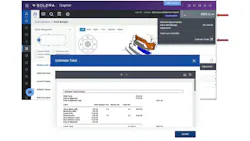
Society of Collision Repair Specialists shares an estimating tip for Solera Qapter users, who can quickly review "Estimate Totals" without having to preview the entire estimate.
- Step 1: Click on the down arrow next to the repair cost
- Step 2: Select Estimate Totals
The estimating databases are intended for use as a guide only. The auto body professional performing the repair is in a position to thoroughly inspect, diagnose, and identify the methodology and cost of the vehicle damage repair.
The DEG is created and funded by the Alliance of Automotive Service Providers and Society of Collision Repair Specialists, whose primary goal is to improve the quality, accuracy, and standardization of collision repair estimates.
View this tip and others on the DEG website by clicking here. For more information about SCRS or to become a member, visit its website.